



 Focus on logical relations
Knowledge base functions
Annotating and outlines
Focus on logical relations
Knowledge base functions
Annotating and outlines


Visualization of complex information
- Create and search nodes easily using the Search bar, add them to your map with a single click.
- Navigate your knowledge base efficiently through node links — including children, parents, and sibling nodes— via the popup menu.
- Link nodes with each other or with annotated text and image fragments to enhance your concept map and preserve context.
- Customize node and edge appearance by creating type templates, allowing consistent styles for shapes, colors, icons, and connection types.
- Drag and arrange nodes freely on the map without being constrained by a predefined layout, giving you full control over the visualization of complex information.
Focus on logical relations

- Each edge links the nearest bottom point of the parent node with the nearest top/side point of the child node.
- A child node may be linked to multiple parent nodes. This approach it suitable for describing networks, not just tree relations
- Parent-child connection represents hierarchical linking (part-whole, object-property, general-specific connection).

- Relation vs edge: a relation is a set of two or more edges where each edge labels the role of the node in this relation.
- E.g. a causal relation connects two child nodes at their top/side points: the one with the edge 'cause' describing the cause of the event, the other describing the result is linked with 'result' edge.
- While both parents and relations involve connections between nodes, relations convey functional linking.
- The list of relations', edges' and nodes' types can be long but finite
- Relation type can define its child edges, e.g.
- causal relationship: {cause, result}
- solve problem: {problem, solution, method}
- transmit: {source, target, data} - You can define the list of types by yourself for the area of knowledge you work with. This systematic approach to storing data makes it well-organized and easily accessible.
Navigate through your knowledge base with the concept map
- Identify hidden connections: hover over a node to see the number of connected links.
- Access popup menus: Right-click a node to open menus for child links (including annotations), parent links, and relations with sibling nodes.
-
Add nodes to your map: Click any node in the popup menu to include it in your current map.
Nodes already present on the map appear in blue. - Leverage intelligent search: Your knowledge base can perform advanced searches, identifying not only direct links but also indirect relationships between objects, helping you uncover complex connections efficiently.


Form has meaning: visual distinction for node and edge types
- Edge styles:
Shape: straight, curved, tree, frame, brackets and scale (example: tree shaped edge for properties and parts, straight egdes for causal relation, frame for quantity)Arrow types: (arrow can mark direction of relations);Stroke and fill: edges can be dashed or dotted, frame can be filled with pattern or color.
- Node styles:
Color coding: e.g., red for persons, blue for organizations.Icons and tags: visually indicate node category or function.Shapes: e.g., rhombus for conditions, triangle for process start, or other shapes reflecting logical or structural roles in the map.
Tools that speed up your work with the map
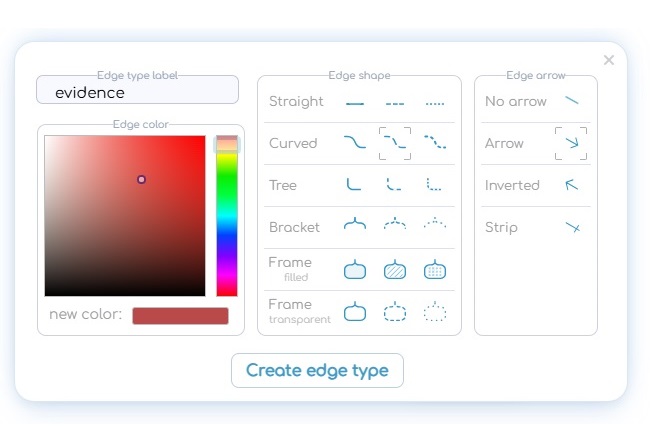
- No need to adjust edges style each time you create an edge or relation between nodes.
- You can create pattern which will be applied any time you assign a type to an edge or relation.
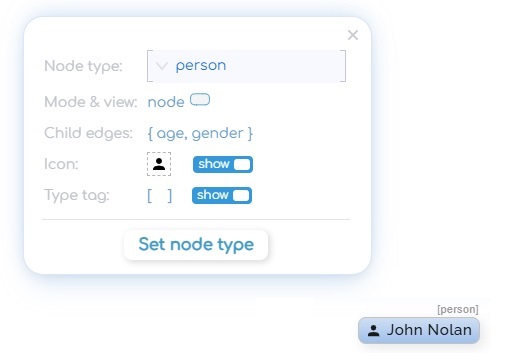
- The style is applied when the type is assigned to the node or the relation.
- The type template contains: color, tag, icon, view mode and even edge types of its child nodes.
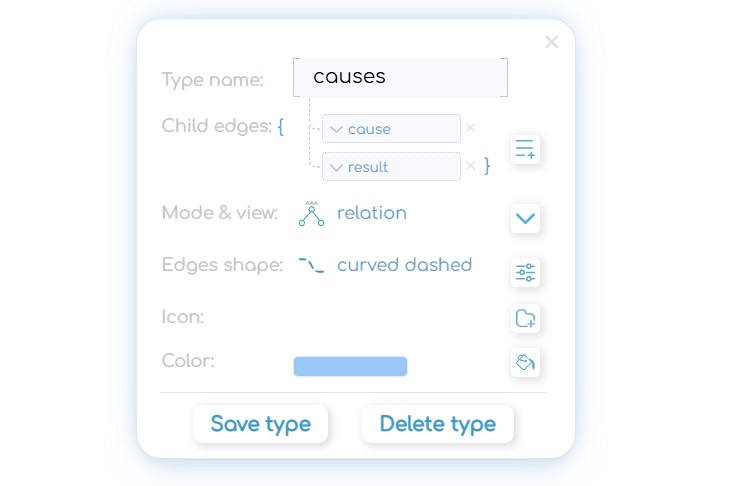
- Create new node or relation types with unique style and child edge templates.
- Selecting a parent nodes/ relation type specifies the recommended list of child edge types for faster creating child links.
Annotating and outlines: link text and image fragments
- Annotate text and images: Link fragments of text or sections of images to nodes, or create callout nodes to highlight important details.
- Child-parent relationships: Annotations become child nodes of the main node and appear in the popup menu. Conversely, the main node is visible in the parent list of annotated nodes.
- Understand complex information: This feature is ideal for texts containing interconnected entities (persons, locations, events) or terms that require explanation.
- Flexible annotation size: Annotated fragments can range from a single word to entire paragraphs, enabling you to mark up sentences, analyze text structure, and link information directly to your knowledge network.


Argument and decision-making maps
- Nodes for statements: Use nodes to represent theses, arguments, and evidence. Each statement node is a full participant in your knowledge base, allowing you to navigate to the supporting data behind the argument.
- Edges reflect relationships: Connections between nodes indicate the role of each statement — such as argument, thesis, evidence, sequence, source, or contradiction .
- Relation types as Argument types: label relationships according to argument type, e.g., Ad hominem, Ad populum, Case study, Analogical argument.
- Nested relationships: A relationship can act as a child of another relationship, enabling you to represent complex logical sequences, conditional conclusions, or multi-layered reasoning.
Where can I use CogniSpectix?
Work and Business
Perfect for project planning, strategy development, team brainstorming and decision making. Visualize complex projects and keep all knowledge in one interconnected map.

Education & Learning
Ideal tool for students, teachers and researchers. Build knowledge maps from lectures, textbooks and papers. Create annotated outlines and understand complex theories.

Research & Deep Analysis
Connect evidence with hypotheses, map theoretical frameworks and discover hidden connections in your field of expertise. Build living knowledge bases that help you see the big picture.

Personal Growth & Life Planning
Use cognitive mapping for goal setting, habit building, career planning and personal knowledge management. Turn your thoughts into clear visual systems.
How to work with your knowledge base?

All those objects are hidden until you add them to the map.
It seems logical to create one file for one subject area ('my work', 'vacation plan', 'my family tree', 'colonization of Mars')

- Click on result item to add it to the map
- Blue items for nodes already on the map
- Click + to create new node
- Right click on icon opens popup menu:
 - parent and sibling nodes;
 - child nodes;
 - participation in maps;
- In mind mapping apps the map is the entire file. But in CogniSpectix a map is just a presentation covering a small part of the file.
- A node can participate in several maps or not in one at all.
- Saving the view as a map is an option but not required. You can also work with your base dynamically
Want to try it yourself?
FAQs
It helps turn complex topics into clear visual maps that show relationships between elements and make information easier to understand and use.
The free version is suitable for personal use, learning, and testing the tool before applying it to work or team projects.
The tool is suitable for individual professionals and teams working on business-related tasks.
It saves only the specific instance you’re currently viewing, with your chosen layout and visible objects.
The full knowledge base file may hold thousands of additional hidden elements that do not appear in the exported SVG.
When you sign up, we store only your email address — nothing more — so you can recover your password if needed.
The application itself is a pure web app that runs entirely in your browser, not on our servers.
Your entire knowledge base — all concepts, connections, notes, and structure — lives and stays exclusively on your device. We never receive, see, or store any of its contents.
It remains fully under your control and is saved only when you choose to export or save the file to your local computer.
Your ideas stay private — always.
It is commonly used to break down large topics, visualize systems, and create clear overviews for decision-making and planning.
 This app is not optimized for mobile. For the best experience, please use a computer.
